Improvised Diagnostics Ooda Loop
Improvised Diagnostics: OODA Loop
The OODA loop is a decision-making model that helps people respond to crises and make better decisions.
OODA Stands For
Observe: Use all five senses to gather information about the situation
Orient: Analyze the information to determine response options
Decide: Choose the best response based on what is known
Act: Carry out the action plan and evaluate the approach
Background
The OODA loop was developed by U.S. Air Force Colonel John Boyd and is often used in:
- Military campaigns
- Commercial operations
- Learning processes
It can be applied to a wide range of incidents, including natural disasters, terrorist attacks, and data breaches.
The OODA loop encourages critical thinking and decision-making skills. It’s a closed system that flows sequentially from one section to the next. The loop continues as the situation evolves, and new decisions and actions may need to be made.
Applying OODA Loop to IT Field Diagnostics
The OODA loop can be an effective model for in-field IT diagnostics by structuring and improving the decision-making process when troubleshooting and resolving IT issues. Here’s how each phase can be applied in this context:
1. Observe
Gather Data
Use diagnostic tools and methods (logs, monitoring software, physical inspections) to collect information about the system’s current state.
- Check error messages
- Note symptoms
- Inspect hardware indicators (e.g., lights or beeps)
- Collect user feedback
Context Awareness
Note the environment, potential user interactions, or recent changes:
- Updates
- New software installations
- Hardware installations
Sense Issues
Use your IT knowledge to identify anomalies or irregularities:
- High CPU usage
- Unusual network traffic
- Performance degradation
2. Orient
Analyze Information
Process the collected data to identify patterns or root causes of the issue:
- Compare symptoms against known problems or documentation
- Use tools like task managers, network analyzers, or event logs to narrow down potential causes
Prioritize Problems
Determine the severity and impact of the issue on operations to decide what to address first.
Contextual Factors
Consider:
- Specific system configuration
- Software environment
- User requirements
3. Decide
Develop Response Options
Brainstorm potential solutions to resolve the issue.
Example: If a system isn’t booting, consider whether to:
- Reseat hardware
- Run a system recovery
- Test for power issues
Evaluate Solutions
Choose the best approach based on:
- Efficiency
- Resource availability
- Risk assessment
Example: Decide whether to apply a temporary fix to restore functionality or take the system offline for a permanent solution.
4. Act
Implement the Solution
Execute the chosen fix while minimizing disruption (if possible).
Examples:
- Replace a faulty component
- Reboot the system
- Update drivers
- Patch software vulnerabilities
Evaluate Results
Verify if the action resolves the issue, and if not, loop back to Observe to reanalyze the situation.
Example: Test the system’s performance or monitor for recurring issues.
Continuous Looping
IT systems and networks are dynamic, so issues may evolve. Reapply the OODA loop as new problems arise during or after the initial fix.
Example in Practice
Scenario: A technician troubleshooting a server that has unexpectedly gone offline
1. Observe
Check server logs, hardware lights, and user reports to identify the symptoms of the issue (e.g., power failure or overheating).
2. Orient
Analyze whether the issue is:
- Hardware-related (e.g., power supply failure)
- Software-related (e.g., misconfigured updates)
Consider the server’s workload and criticality.
3. Decide
Choose to test the power supply and reseat connections as the first step, delaying non-critical updates.
4. Act
Perform the chosen actions, monitor the server’s response, and verify system stability.
Benefits for IT Diagnostics
This structured approach helps:
- Streamline diagnostics
- Ensure critical thinking
- Adapt to evolving situations
- Maintain focus during complex troubleshooting
The OODA loop is essential for effective in-field IT diagnostics, especially when dealing with unfamiliar or complex issues.
Visual Reference
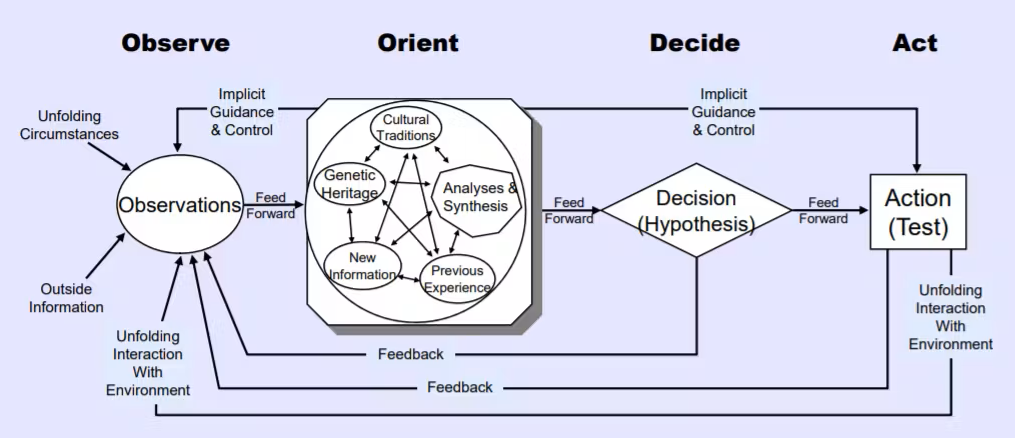 The OODA Loop cycle: Observe → Orient → Decide → Act → (repeat)
Quick Reference Card
| Phase | Key Actions | IT Examples |
|---|---|---|
| Observe | Gather data, check symptoms | Review logs, check hardware lights, collect error messages |
| Orient | Analyze patterns, prioritize | Compare to known issues, assess impact, check documentation |
| Decide | Evaluate options, choose solution | Select best fix based on risk/efficiency, plan approach |
| Act | Implement fix, verify results | Apply solution, test system, monitor for recurrence |